Modules are MyStudio's features: a better editor, forum icons, a shop, points, SEO and more. Every one is optional and starts off, so nothing clashes with plugins you already use.
In short
- MyStudio → Modules: Activate, Settings, Deactivate
- Deactivating keeps a module's settings and content
- Every theme works with every module off, and every module under every theme
Switch modules on and off
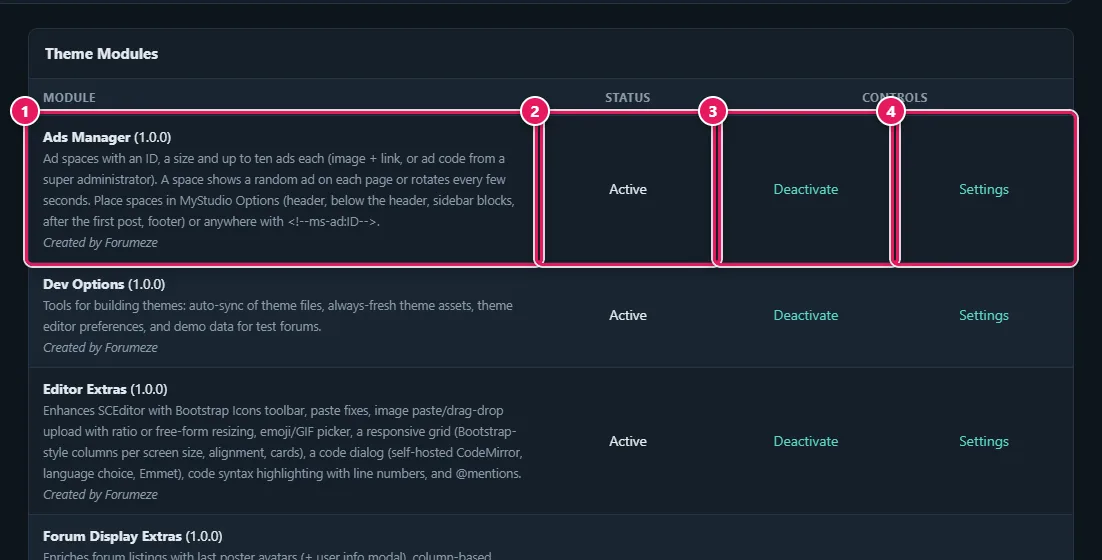
- Activate: the first time, it creates its tables and templates.
- Settings, or its own page in the MyStudio menu.
- Deactivate to stop; its settings and content (orders, points, pages) wait in the database.
Changes reach the forum at once; no sync needed.
Theme modules and site tools
Theme modulesLoad only if the active theme lists them in
theme.json. MyStudio Default lists all.Site toolsSuch as SEO: work under every theme.
The modules
| Module | What it does | Guide |
|---|---|---|
| MyStudio Options | Header, footer, width, sidebar blocks, menus, fonts, colour mode, announcement bar | Layout options |
| Editor Extras | Icon toolbar, emoji and GIFs, image paste, code highlighting, columns, tables, @mentions | Editor Extras |
| Forum Icons | An icon or image per forum and category | Forum Icons |
| Forum Display Extras | Last poster avatars, subforum columns, card layout | Forum Display Extras |
| Posting Extras | Post likes, portal social feed, quick search, new-thread pop-up | Posting Extras |
| User Profile Extras | Profile banners, status updates, random avatars, alerts | Profile Extras |
| Shop | Products, cart, checkout, orders, downloads, reviews | Shop |
| Payments | PayPal payments, refunds, subscriptions, donations | Payments |
| Licensing | Licence keys and updates for software you sell | Licensing |
| Points | Points economy, lottery, paying with points | Points |
| Awards | Automatic and manual member awards | Awards |
| Ads Manager | Ad spaces, rotation, selling ad spaces | Ads Manager |
| Content Manager | Custom pages, blog, collections | Pages, Blog, Collections |
| SEO | Permalinks, sitemap, meta tags, structured data, IndexNow | URLs and sitemap, Search tags |
| Dev Options | Auto-sync, fresh assets, editor preferences, demo data | Dev Options |
Modules that work together
Shop + PaymentsThe Shop needs Payments to take money.
Licensing + ShopKeys for Shop products.
Points + ShopPay with points.
Ads + PaymentsSell ad spaces.
Modules and MyBB plugins
Modules never change MyBB's own Admin CP pages; each has its own page under MyStudio. Don't run a module and a plugin that do the same job: the Themes page warns and offers to switch the module's feature off.
Settings and updates
Module settings are in the database and shared by every theme. Updates update modules and keep their settings. Build your own: creating a module.