Editor Extras turns MyBB's post editor into a modern one. Every feature can be switched on or off.
In short
- Activate it in MyStudio → Modules; features on MyStudio → Editor Extras
- Upgrades MyBB's own editor: new threads, replies, quick reply, PMs and signatures
- Everything posts as standard MyCode
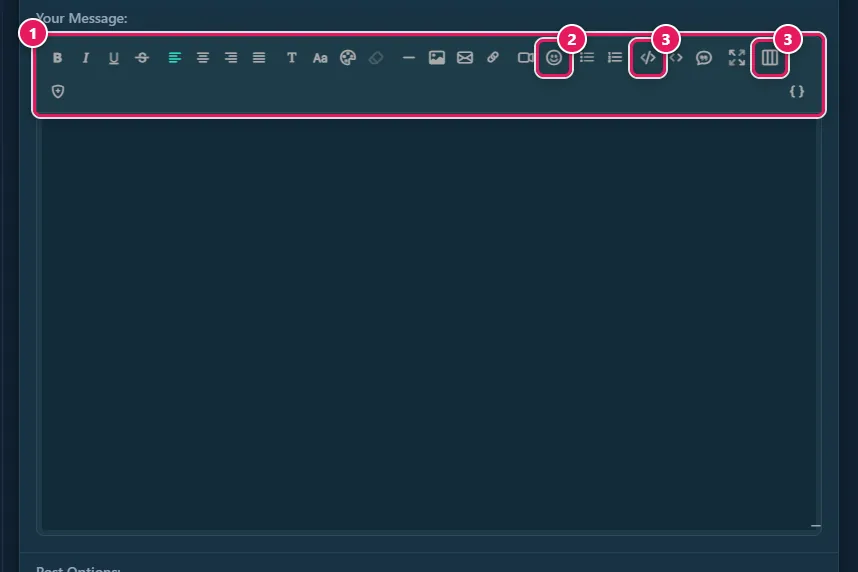
What it adds
Icon toolbarModern icons; an optional frosted-glass look for dark themes.
Clean pasteKeeps bold, links and lists, drops clutter. Optionally strip all inline styles.
ImagesPaste or drop to upload; scaled to Max Image Width; resize handles.
Emoji and GIFsSearchable emoji; GIFs from Tenor or GIPHY with your free API key (stored as a secret).
CodeA code dialog with language and Emmet; highlighting and line numbers in posts.
ColumnsResponsive grids that stack on phones.
@mentionsPick a member as you type; alerts them if they can read the thread.
Drafts and countsAuto-saved in the browser; word and character count.
Images: paste, drop, resize
- Turn on Image Paste & Drag-Drop: a pasted screenshot or dropped file uploads as an attachment (MyBB's attachment permissions and limits apply).
- Set Max Image Width: larger images are scaled down.
- Image Resize Handles with Image Resize Mode: keep the ratio or resize freely.
Code blocks
The Code Editor Dialog inserts a [code=php] block with the language you choose. Code Syntax Highlighting colours it in posts. Inline code: [icode].
Columns and grids
The Grid button sets columns per line for phones, tablets, laptops and desktops, the gap, alignment and an optional card look. Behind it is simple MyCode:
[row md=2 gap=3 cards=1]
[col]Left column text[/col]
[col]Right column text[/col]
[/row]
Rows can hold tables and other rows (three levels). On phones columns stack.
More MyCode
| MyCode | Gives |
|---|---|
[table] [tr] [th] [td] | Tables, optionally striped or numbered |
[icon]star-fill[/icon] | An icon from the themes' icon library |
| Sized images | Keep their shape on every screen |
Good to know
- Switching the module off later keeps content readable, but grid and table tags show as text: keep it on once members use them.
- The MyCode works in every parsed message, Shop descriptions and collection entries included.
- On phones the toolbar wraps and pickers fit the screen.