The MyStudio Options module gives every MyStudio theme a Layout & Appearance page. Each choice shows a small wireframe, so you see what you pick.
- Switch on MyStudio Options in MyStudio → Modules, then open MyStudio → MyStudio Options
- Settings are per theme: choose it in Settings for
- Options live in the database, so updates and syncs never reset them
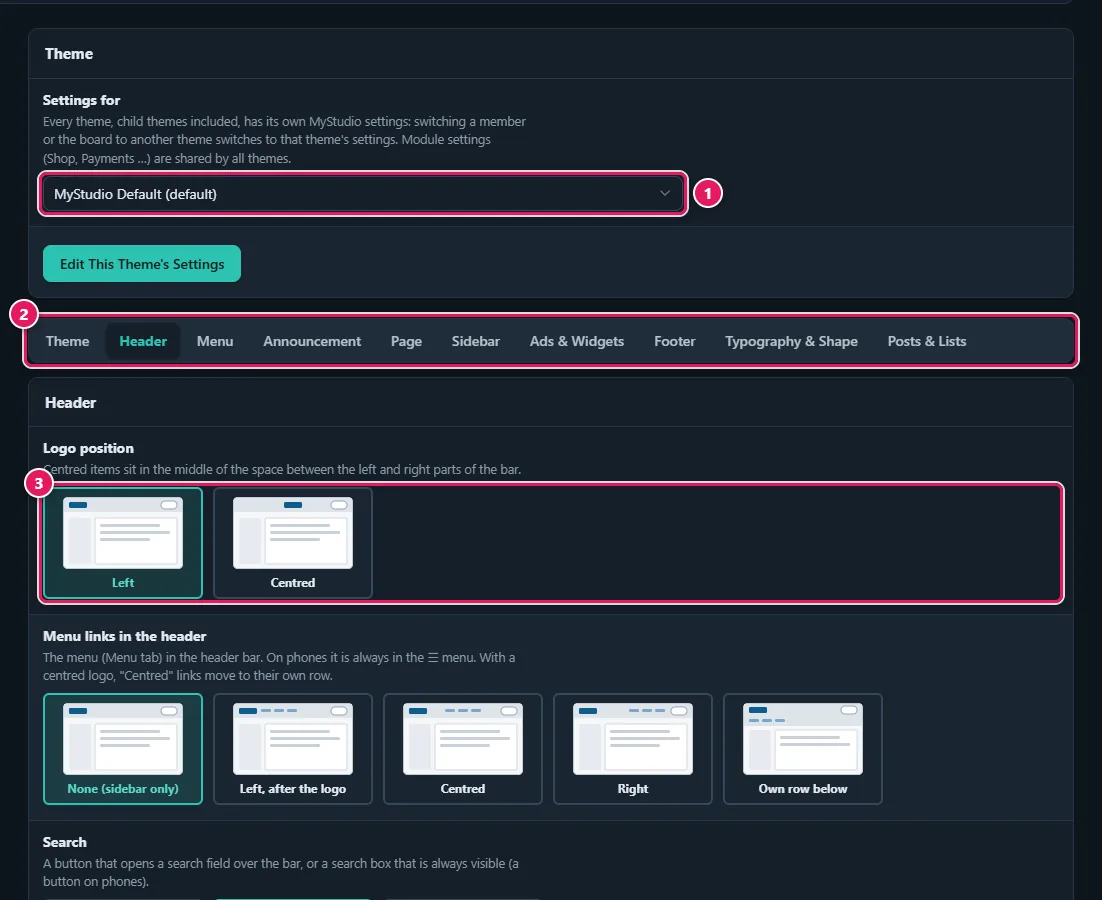
Header
Menu
Drag and drop the header and sidebar menu: portal, forums, search, members, calendar, shop, blog and your own links with icons. See sidebar blocks and menus.
Announcement bar
One line above the header on every page, with an optional link and colour. With Visitors can close the announcement they can dismiss it; it returns when you change the text.
Page
Sidebar
Left, right or off (the menu then moves into the header). Its blocks (menu, latest activity, latest blog posts, ad spaces) are drag and drop. See sidebar blocks.
Ads and widgets
- Latest activity above the forum list: newest threads or posts on the index.
- With the Ads Manager: ad spaces in the header bar, below the header, after the first post and above the footer.
Footer
Minimal, centred or columns; an about text and copyright line; the theme chooser, language chooser and time on or off; social links as icons.
Typography and shape
| Setting | Choices |
|---|---|
| Text font (and theme font roles) | See fonts |
| Base text size | 13 to 18 pixels |
| Spacing | Compact, comfortable, spacious |
| Corners | Sharp, rounded, extra round (cards, buttons, inputs) |
| Avatar shape | Circle, rounded square, square |
Posts and lists
Post layout (author above or beside; members who chose classic keep it), signatures, compact thread lists, and the forum list as rows or cards (with Forum Display Extras).
Colour mode
Tips
- Changes apply only to the theme in Settings for; save each theme you want the same.
- Each theme starts from its designer's defaults (MyPlayer: no sidebar, wide page) and shows only options it supports.
- Developers set starting values in
theme.json"studio_options": theme.json reference.