MyStudio updates itself from the Admin CP: it shows exactly what changes, backs up everything it replaces and rolls back by itself if anything fails.
- MyStudio → Licence & Updates: Download and Review, then Install
- Your child themes, settings and uploads are never touched
- The last three versions are kept as backups to restore
How you hear about it
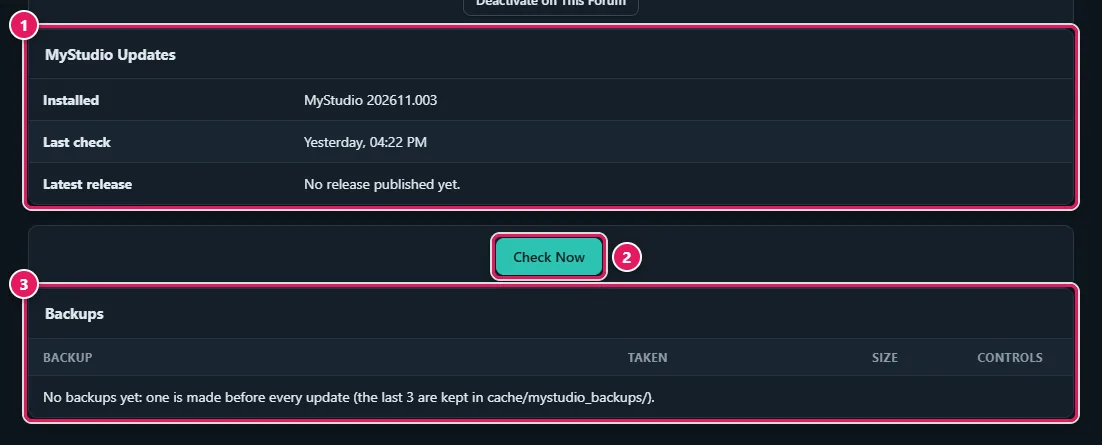
MyStudio checks twice a day in the background. When your licence includes a new release:
Can't wait? Check Now on Licence & Updates (twice a day at most).
Update
- Download and Review: checked against the signed release record (SHA-256 and size). Nothing changes yet.
- Read the review: files replaced, added and removed, and files changed on your forum that would be overwritten.
- Install: backup, new files, then upgrade steps (module templates, database changes, re-sync of shipped themes and their children).
If any step fails, the backup goes back automatically.
What changes, what never does
| Replaced by updates | Never touched |
|---|---|
|
|
Edited a shipped theme directly? Those files are replaced (the review lists them, the backup keeps them). Use a child theme.
Backups and restore
Each update leaves a backup in cache/mystudio_backups/ (the last three). The Backups table lists date and size; Restore puts that version back.
Requirements and special cases
curl and sodium, and write access to MyStudio's files (the review lists any it can't write)..git folder updates with git.When your updates period ends
You keep every release published while updates were included. Newer ones are listed with a note to renew; after renewing, the next check offers them. See your licence.
What's new
Every release is announced in the forumeze.com forums and listed on the MyStudio product page with its notes.