MyStudio is installed and licensed. Six short steps give your forum its own look in about ten minutes.
- Theme → colour and logo → modules → layout → phone check → search engines
- Everything here is settings; no code
Choose your theme
- Open MyStudio → Themes. MyStudio Default is already the default.
- For another theme, click Sync on its card, then Set as Default.
Not sure? Try them all on the live demo or see the 11 included themes.
Going to change templates or CSS? Make a child theme first and set it as default. Updates then never undo your changes.
Set your colour, logo and favicon
MyStudio → MyStudio Options, tab Theme (with MyStudio Options off: MyStudio → Themes → Theme Settings).
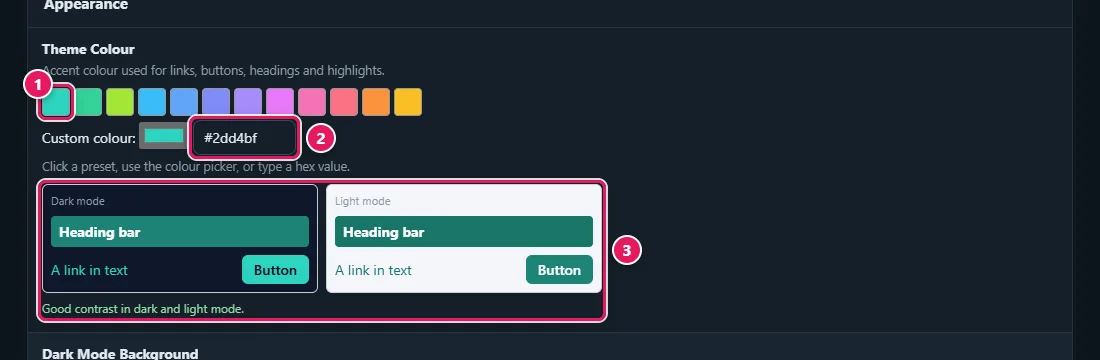
More: colours, logo and favicon.
Switch on the modules you need
MyStudio → Modules. Every module starts off. A good first set:
All of them: MyStudio modules.
Pick your layout
In MyStudio → MyStudio Options: header and footer layout, page width, sidebar side and blocks, and light, dark or system colour mode. See layout options and sidebar blocks and menus.
Check it on a phone
The sidebar becomes a drawer, lists and threads reflow and the editor stays usable. See MyStudio on phones.
Optional: clean URLs and search engines
- MyStudio → SEO → Permalinks: choose a type for addresses like
/forum-name/thread-title. - Submit
/sitemap.xmlto search engines.
More: clean URLs and the sitemap.
Who can use MyStudio in the Admin CP?
- Every Administrator can open MyStudio's pages.
- Limit an admin to some pages in Users & Groups → Admin Permissions, tab MyStudio.
- Sensitive actions (PHP code, payments, refunds, licensing, server rewrites) are for super administrators, unless granted through Delegation.