A child theme changes a few things about another theme (its parent) and inherits the rest. It is the safe way to customise: updates to the parent never undo your changes.
- More → Create Child Theme on any theme card
- It holds only what you change; fixes in the parent still reach it
- It has its own colour, logo, layout and fonts
Why a child theme?
Updates replace the shipped themes' files. Edit MyStudio Default directly and the next update puts its files back (the review warns you and the backup keeps them, but you redo the work).
The ten included themes are child themes of MyStudio Default: see them.
Create one
- MyStudio → Themes.
- On the theme to customise: More → Create Child Theme.
- Name it (e.g. My Forum Look) and click Create Child Theme.
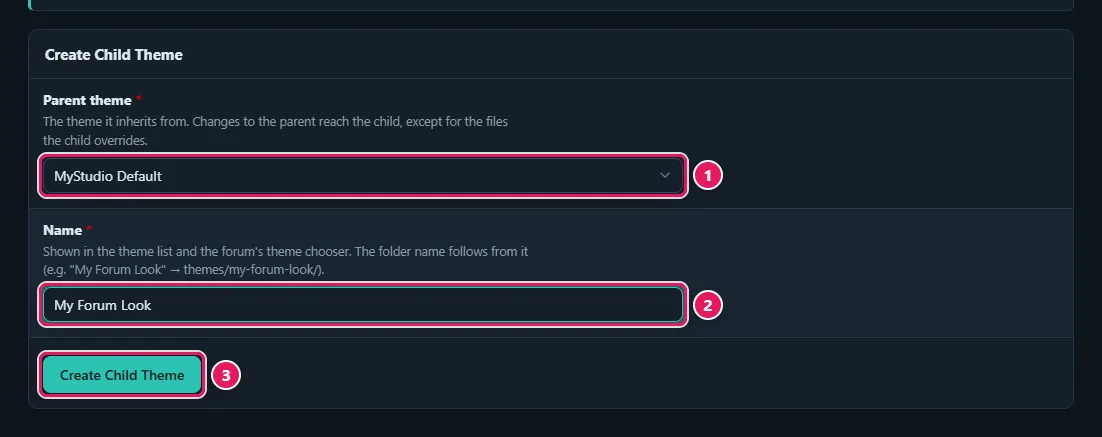
MyStudio creates themes/my-forum-look/ with a theme.json naming the parent, syncs it and opens the editor. Child themes can have children too (up to five levels).
Change a template or stylesheet
- In the editor, open the parent's file (dimmed, with an arrow), e.g.
templates/header/header.html. - Click Override in this theme: you get a copy.
- Edit it and press Ctrl+S. Revert to parent undoes the override.
Small CSS changes: add your own small stylesheet (e.g. css/custom.css), list it in the child's theme.json and sync, instead of overriding a large parent stylesheet.
Give it its own look
Set it as default, then pick it in Settings for in theme settings and MyStudio Options.
What it inherits
| Part | Inherited? |
|---|---|
| Templates | Yes: same name replaces, a new name adds |
| Stylesheets | Yes: same file name replaces; new ones are listed in the child's theme.json |
| Theme settings, MyStudio Options | No: every theme has its own |
| Module settings (Shop, Payments …) | Shared by all themes |
| Theme PHP (hooks, language strings) | Yes: the child's run after the parent's |
Full rules: child theme development.
After a parent update
Overridden files no longer follow the parent. Compare them with the parent's new versions (especially if the update notes mention them) and copy over what you want. Other files update by themselves.
Plugins that add lines to templates
Syncing restores the theme's templates, so a plugin's {$myplugin} line belongs in your child theme: override the template, add the line, save.