A full code editor inside the MyBB Admin CP: a file tree, tabs, syntax colours and autocomplete. Press Ctrl+S and the forum updates.
- Open it with Edit on a theme card in MyStudio → Themes
- Every save passes MyBB's template security check
- Edit a child theme, never the shipped themes
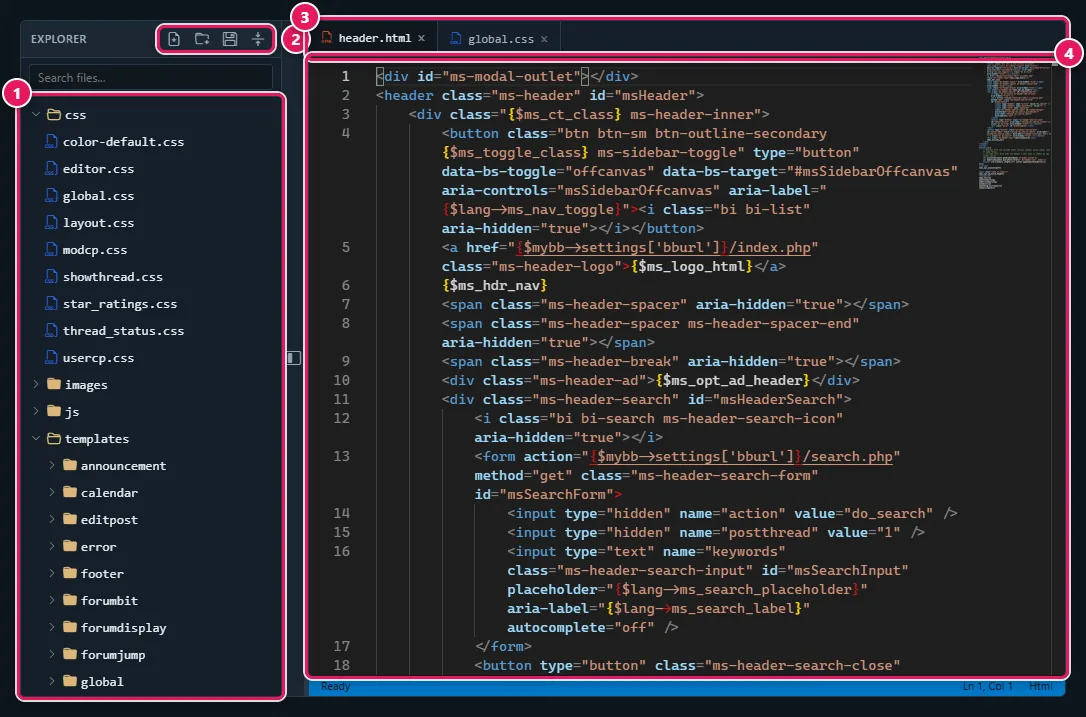
What it can do
css/, js/, images/, theme.json; filter by name.ul>li*3 + Tab expands, in HTML and CSS.Colour scheme: Dev Options.
Save with Ctrl+S
Ctrl+S (Cmd+S) saves and updates MyBB's copy at once.
theme.json.One file per template
Each template is a .html file with its MyBB name: templates/header/header.html is header, templates/postbit/postbit_classic.html is postbit_classic. Folders only group them.
Child themes: override and revert
- The tree shows the parent's files dimmed, with an arrow.
- Override in this theme gives you your own copy to edit.
- Revert to parent deletes your copy again.
Don't edit the shipped themes directly. Updates replace them. Make a child theme and edit that.
Prefer your own editor?
Edit the files on your computer or in version control, upload them, then click Sync (or turn on auto-sync in Dev Options). See how themes work.
Who can use it?
Admins with the permission for MyStudio's Themes page. It only opens files inside the theme's folder and never creates or uploads PHP files there.