MyStudio → Themes manages every MyBB theme on your forum: default theme, sync, editor, child themes, packages and deleting.
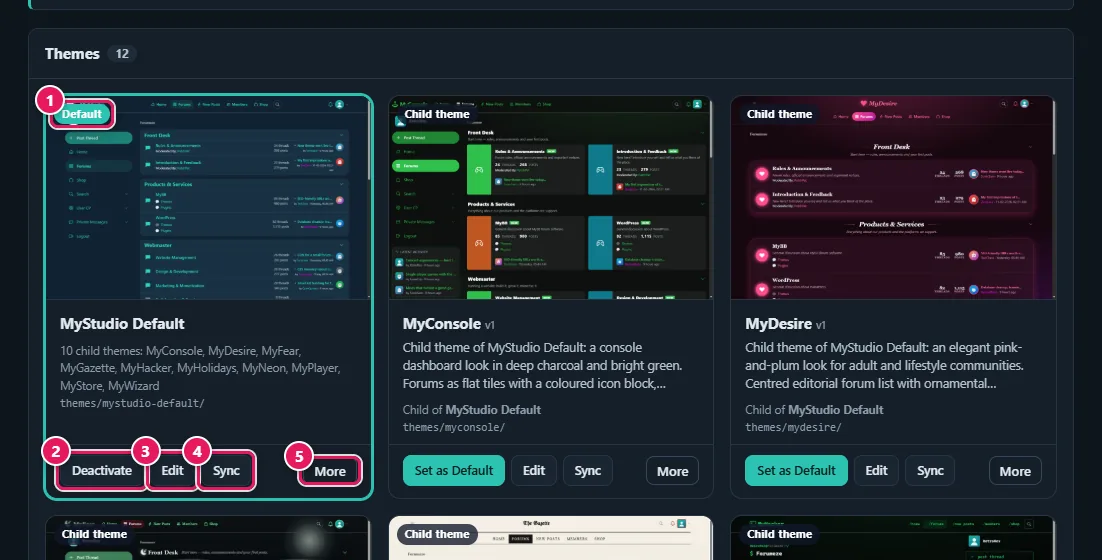
Theme cards and badges
Every theme in themes/ has a card. Click the screenshot to see it full size.
Set the default theme
Set as Default on a synced theme: guests and members who haven't picked a theme see it from the next page. On the current default the button reads Deactivate, which hands the forum back to MyBB's default theme.
Every change of state asks for confirmation on its own page, so a stray click never switches your forum's theme.
Sync: copy theme files into MyBB
MyBB reads themes from its database; Sync copies a theme's templates, stylesheets and settings into it. You need it after:
Saving in the theme editor updates MyBB at once. Syncing a parent also syncs its children. Developers can turn on auto-sync in Dev Options.
Let members choose
- Allow groups in Templates & Style → Themes → the theme → Allowed User Groups (MyBB's own setting).
- Members pick it in User CP → Edit Options → Theme; with MyStudio Options on, also from the footer theme chooser.
Create a child theme
More → Create Child Theme: a new theme that inherits everything and holds only what you change. The safe way to customise. See child themes.
Export and import packages
More → Export Package opens the package forms with the theme selected: one ZIP with the theme, its PHP, options and modules. See theme packages.
Delete a theme
More → Delete Theme removes it from MyBB and, if you choose, its folder.
You can't delete the default theme or a theme with child themes. Deleted files can't be brought back: export a package first if you may want it again.
Warnings on the page
| Warning | What it means |
|---|---|
| nginx rules missing | nginx ignores .htaccess: copy the rules shown to keep theme sources private |
| Plugins doing the same job | A MyBB plugin duplicates a module; a button switches the module's feature off |
| Templates a plugin changed | The next sync would restore them and remove the plugin's line |
| Broken themes | A child theme's parent is missing, or the chain loops |
| Update available | A new MyStudio release your licence includes |