Installing MyStudio takes about ten minutes and no PHP knowledge: upload, make three folders writable, activate, paste your key.
- MyBB 1.8.38+, PHP 8.0+, MySQL 5.7+ or MariaDB 10.3+
- FTP or your host's file manager
- The MyStudio ZIP and licence key from your forumeze.com account (User CP → My products)
Check the requirements
| Requirement | Version |
|---|---|
| MyBB | 1.8.38 or newer |
| PHP | 8.0 or newer, with fileinfo, json, curl and sodium. zip is optional (MyStudio has its own ZIP handler). |
| Database | MySQL 5.7+ or MariaDB 10.3+ |
| Web server | Apache 2.4+ (mod_rewrite for clean URLs) or nginx |
Admin CP → Home shows your MyBB and PHP versions.
Back up first. MyStudio doesn't change MyBB's own files, but a backup costs a minute and saves hours.
Upload the files
Unzip the download and copy these into your forum's root (the folder with index.php):
inc/plugins/ms.php
inc/plugins/mystudio/
inc/tasks/ms_licence.php
admin/modules/mystudio/
admin/styles/mystudio/
jscripts/mystudio/
themes/.htaccess
themes/mystudio-default/
themes/myhacker/, themes/myplayer/, … (the child themes you want)admin/ folders inside it. MyStudio finds it..htaccess: the Themes page shows the rules to copy into your server block.Make three folders writable
themes/Theme files you edit, child themes you create.uploads/Logos, banners, shop images, fonts.cache/Compiled CSS, update backups, import files.On Linux hosting: 755 or 775, owned by the web server user.
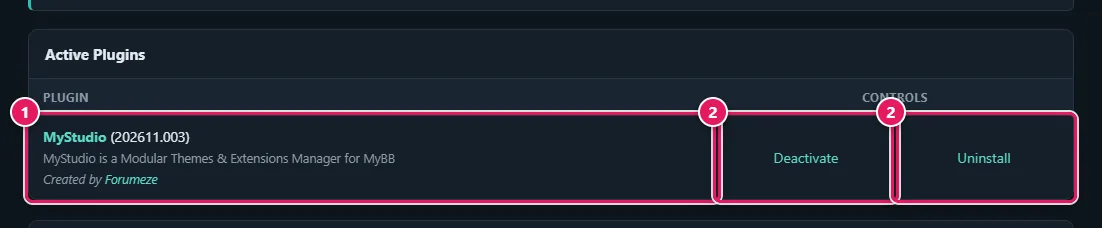
Install and activate the plugin
- Admin CP → Configuration → Plugins.
- Find MyStudio and click Install & Activate.
- You land on MyStudio → Licence & Updates.
Activate your licence key
Paste your key and click Activate. MyStudio then sets itself up:
Reload your forum with Ctrl+Shift+R (Cmd+Shift+R on a Mac). Local copies, staging sites and new domains: activating your licence.
Offer more themes (optional)
- MyStudio → Themes: every theme has a card.
- Sync each child theme you want members to pick.
- Set as Default on the one visitors should see.
More: managing MyBB themes.
Other MyBB plugins
Most work alongside MyStudio. The Themes page warns you about two kinds:
Uninstalling
Configuration → Plugins → MyStudio → Uninstall removes MyStudio's settings.
- Theme folders in
themes/stay: they may be your only copy. Delete them by hand. - Module content (orders, points, pages, blog posts) stays in the database and comes back if you reinstall.
Next steps
Follow the first steps to give the forum your colours and logo.