Manage MyBB themes: sync, set default, export and delete
The MyStudio Themes page explained: theme cards, setting the default MyBB theme, syncing files, offering themes to members, exporting and deleting.
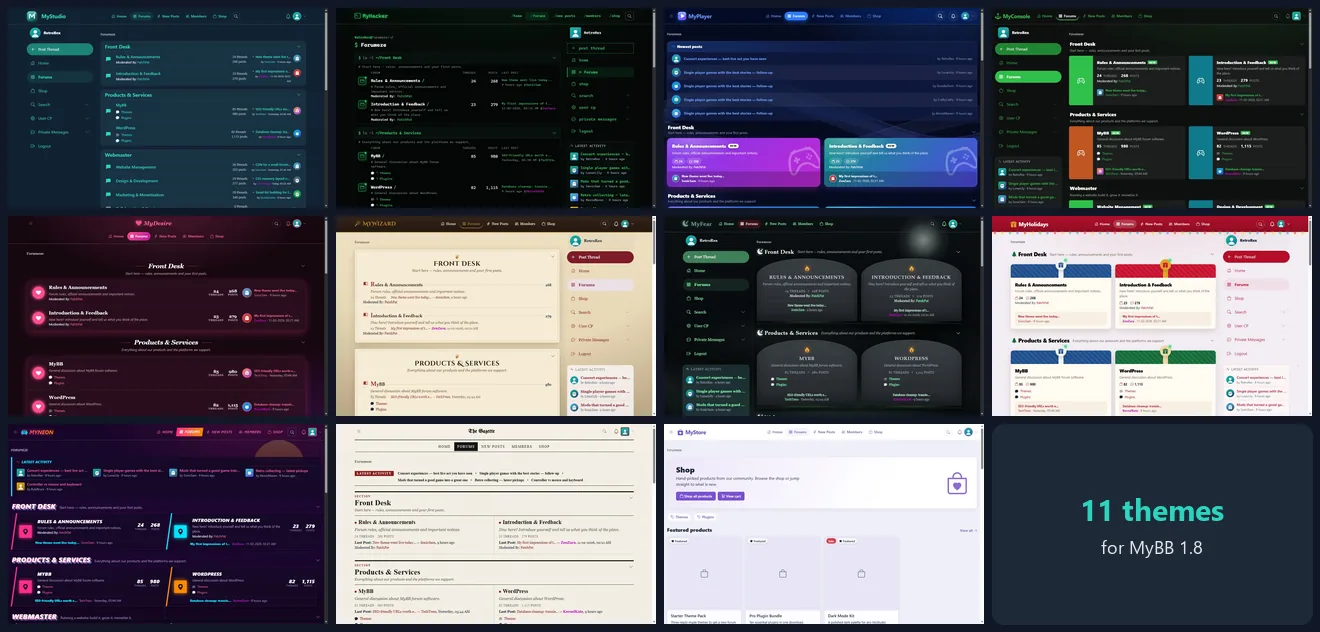
The 11 MyBB themes included with MyStudio
Meet the 11 responsive MyBB 1.8 themes in MyStudio: MyStudio Default and 10 child themes, from a dark gaming look to a newspaper and a store.
Change MyBB theme colours, logo and favicon without code
Use Theme Settings to change your MyBB theme colour with a live light and dark preview, upload a logo and favicon and style the logo text.
MyBB layout options: header, sidebar, page width and dark mode
MyStudio Options lets you choose header and footer layouts, page width, sidebar side, light or dark mode, an announcement bar and widgets per theme.
MyBB sidebar blocks and menus with drag and drop
Arrange your MyBB forum's sidebar blocks and build header and sidebar menus with drag and drop, icons and links, without editing templates.
Add Google Fonts to MyBB: hosted locally or from a CDN
Choose fonts for your MyBB theme, add any Google font hosted on your own server or loaded from Google, and preview every style before you use it.
Edit MyBB templates and CSS in the MyStudio theme editor
The built-in MyBB theme editor: a file tree, tabs, syntax colours, autocomplete, search and Ctrl+S to save templates, CSS and JavaScript instantly.
Customise a MyBB theme safely with a child theme
Create a MyBB child theme in MyStudio to change templates, CSS and settings while the parent theme keeps getting updates. Step by step.
Import and export MyBB theme packages (ZIP)
Export a MyStudio theme with its code, options and modules as one ZIP, and import theme packages safely with a review screen before anything is installed.
A mobile-friendly MyBB forum: MyStudio on phones
How MyStudio themes adapt MyBB to phones and tablets: the sidebar drawer, touch-friendly forum lists, threads, the post editor and the Admin CP.